FEATURES

Run a mixed UPS fleet without hopping between vendor tools.

MayaUPS puts your networked UPS units and the ones on USB or serial side by side in one local interface. You read the alarms in plain language, check the history, plan battery and maintenance work, and rehearse shutdown rules before you arm them.

Monitoring

Read networked equipment with SNMP v1/v2c/v3

Your UPS units, power distribution units, transfer switches and room sensors report in through their network-management cards.

  • SNMPv3 with authentication and encrypted traffic
  • Status, battery charge, runtime, load, voltage, temperature and alarms
  • Charts for the last 24 hours, 7 days and 30 days, with CSV export
Direct attach

No network card? USB or serial works too

The optional MayaUPS agent reads supported USB-HID and Megatec/Q1 serial units, so the UPS under a desk gets watched like the ones in the rack.

  • USB-HID for supported UPS hardware
  • Megatec/Q1 serial communication
  • The same fleet view as your networked devices
Fault decoding

Alarms in plain language, not vendor codes

MayaUPS turns RFC 1628 and vendor data into messages you can act on: On battery, Replace battery, Overtemperature.

  • Standard UPS readings through RFC 1628
  • Extra manufacturer detail where the device supports it
  • The same alarm wording across every brand you run
app.local / fleet

Fleet overview

Demo data - 5 devices - 1 on battery - 1 warning

DeviceLoadRuntimeStatus
Rack A - Core
APC UPS
42%
38 minOnline
Rack B - Edge
Eaton UPS
61%
21 minOn battery
MDF
Vertiv / Liebert
34%
51 minOnline
Facilities
CyberPower UPS
55%
29 minWarning
Utility Room
XPC UPS
48%
33 minOnline
Server Room B
Tripp Lite UPS
39%
44 minOnline
Print Room
Delta UPS
22%
58 minOnline
IDF West
RFC-1628 UPS
27%
64 minOnline
Active alerts
2
Fleet runtime - 24 h
Load by device
Rack
Rack
MDF
Facilities

The software, as it actually runs

Real screenshots of MayaUPS at work, captured from the built-in demo environment. No mockups.

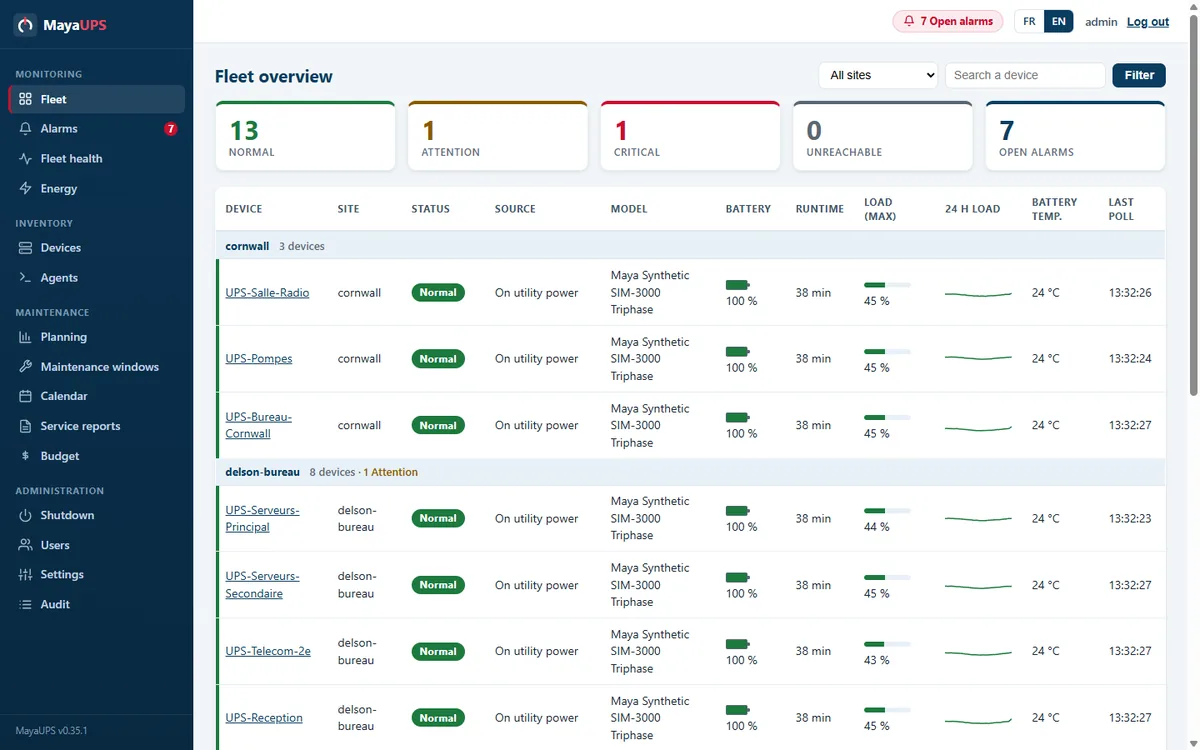
MayaUPS fleet overview: UPS devices grouped by site with status, battery, runtime and load
Fleet overview: every UPS on one screen, with status, battery, runtime, load and the last reading, grouped by site.
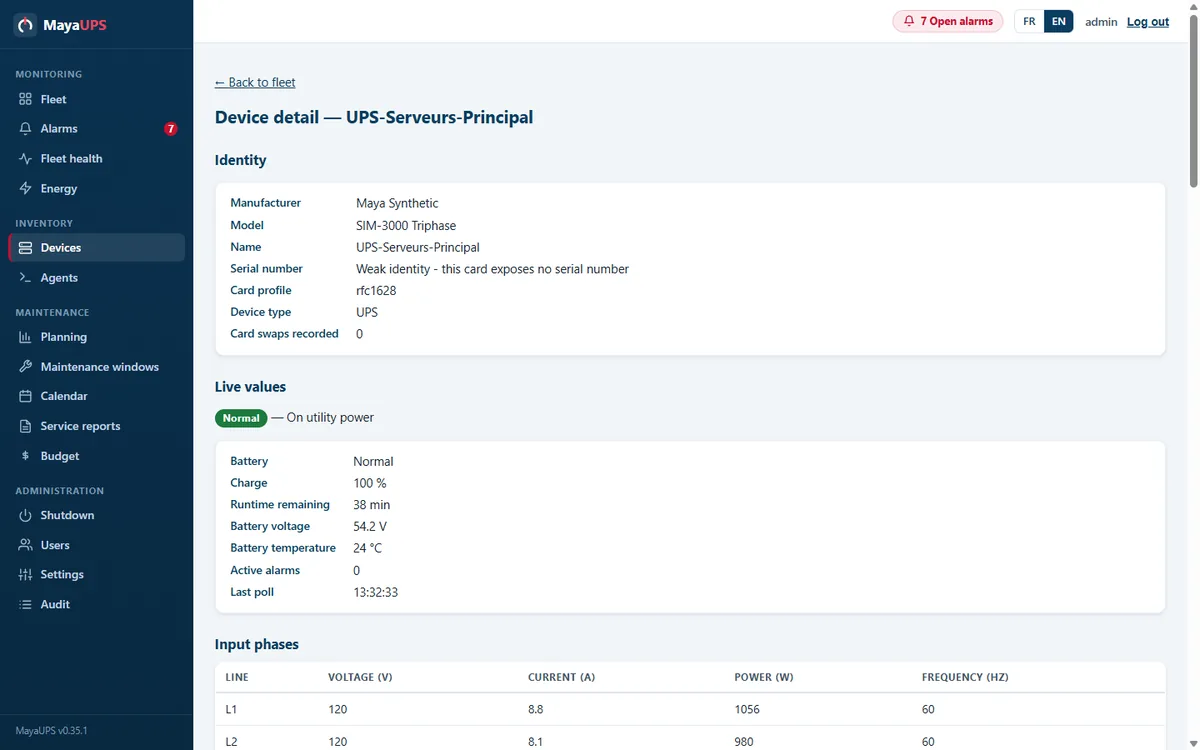
MayaUPS device detail: identity, live values and per-phase input readings
Device detail: identity, live values and per-phase input readings, with the card profile that decodes the data.
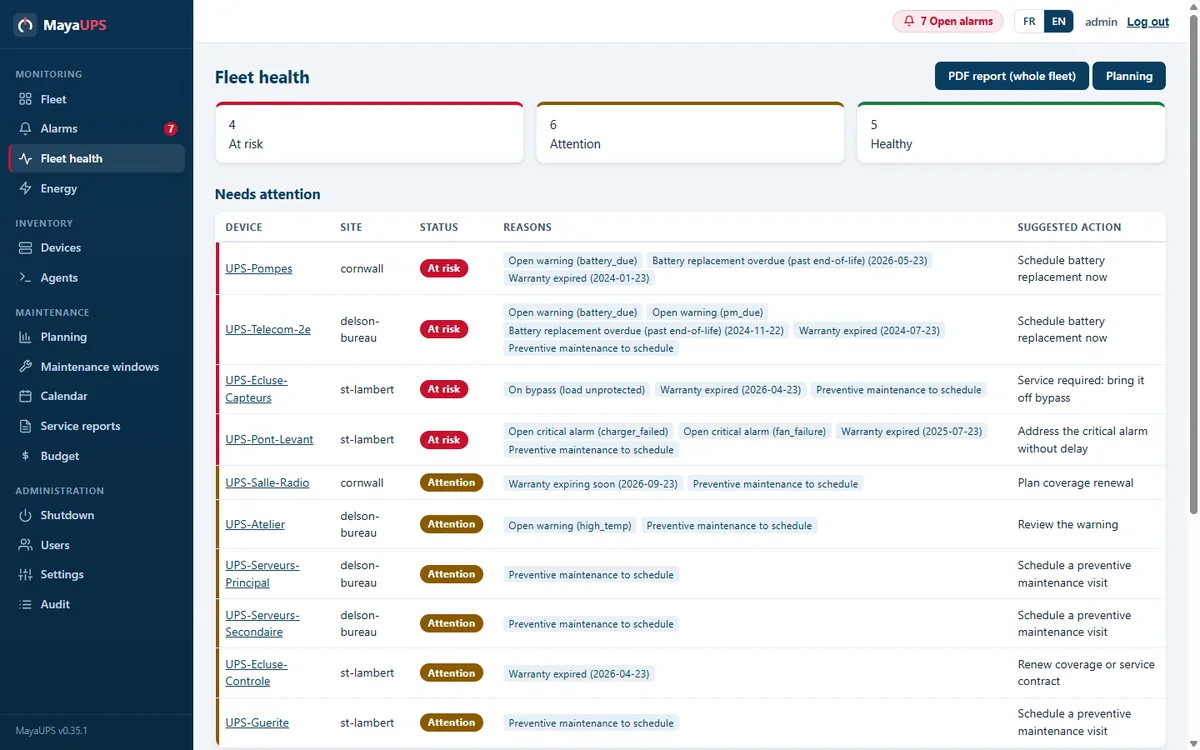
MayaUPS fleet health page: devices ranked at risk, attention and healthy, with reasons and suggested actions
Fleet health: every device is ranked, with the reasons (battery end of life, open alarm, expired warranty) and a suggested action.
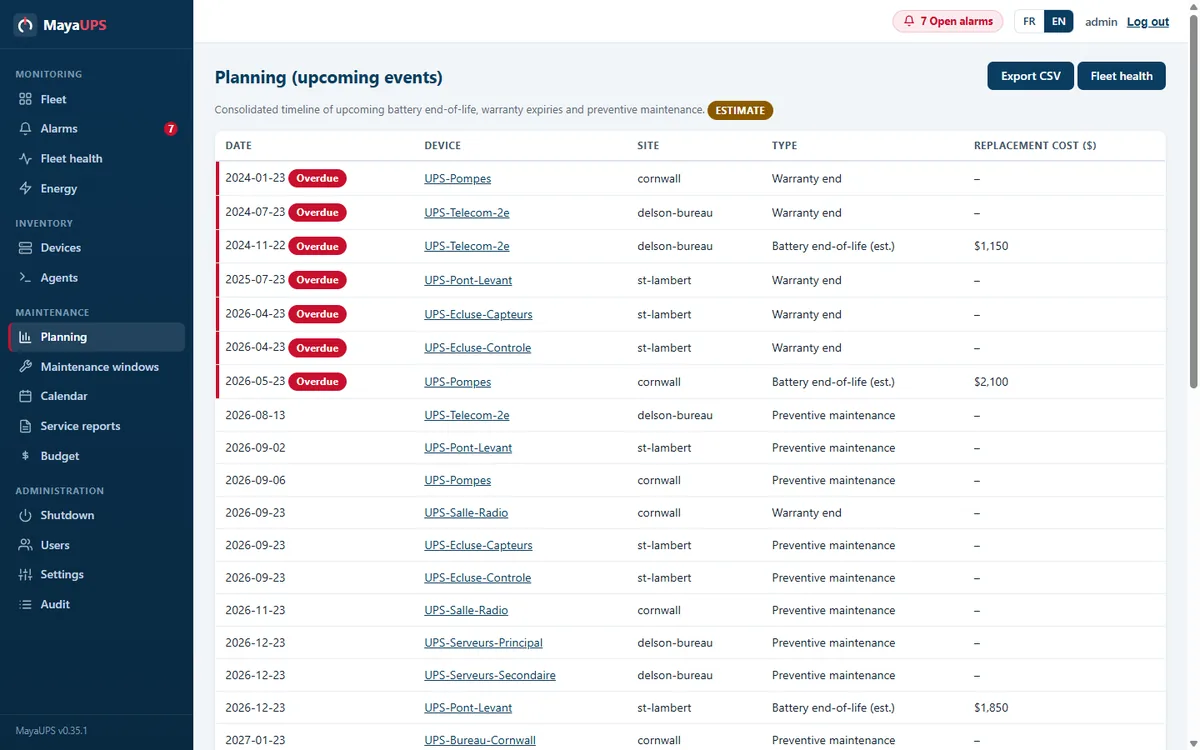
MayaUPS planning page: timeline of battery end of life, warranty expiries and maintenance with estimated costs
Planning: battery end of life, warranties and preventive maintenance on one timeline, with estimated replacement costs and CSV export.
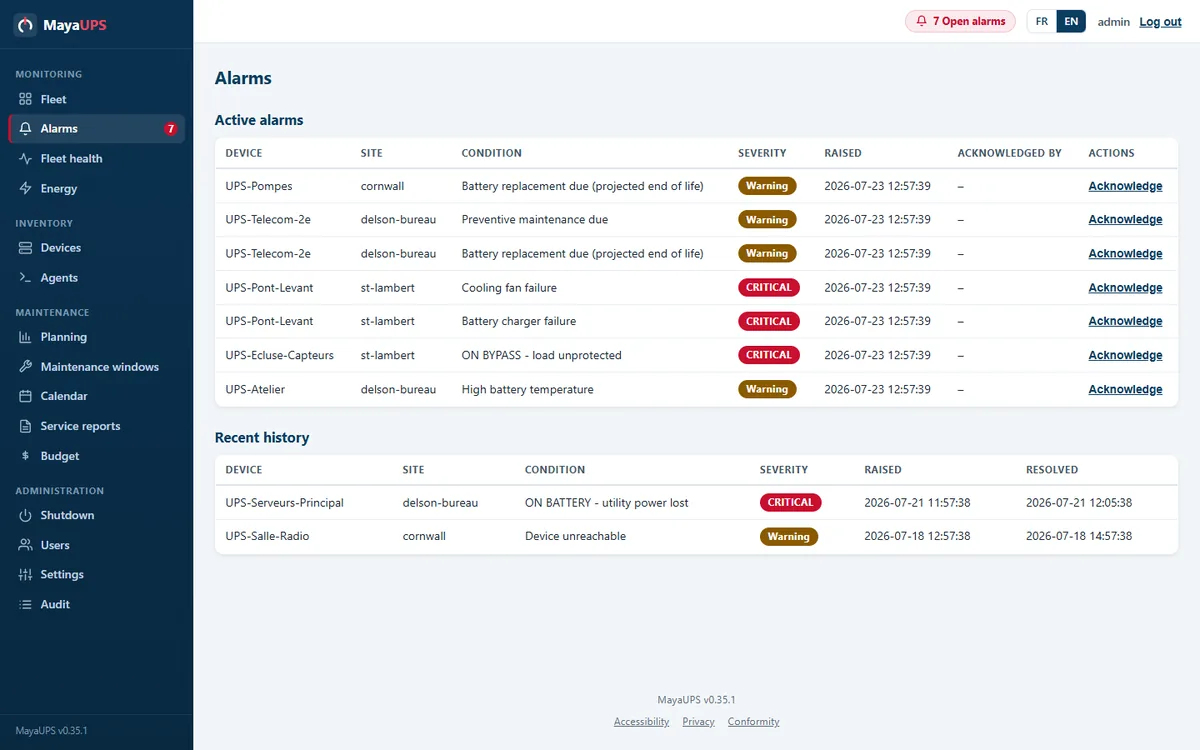
MayaUPS alarms page: active alarms with severity, acknowledgement and recent history
Alarms: conditions decoded into readable messages (fan, charger, bypass), severity, acknowledgement and history.
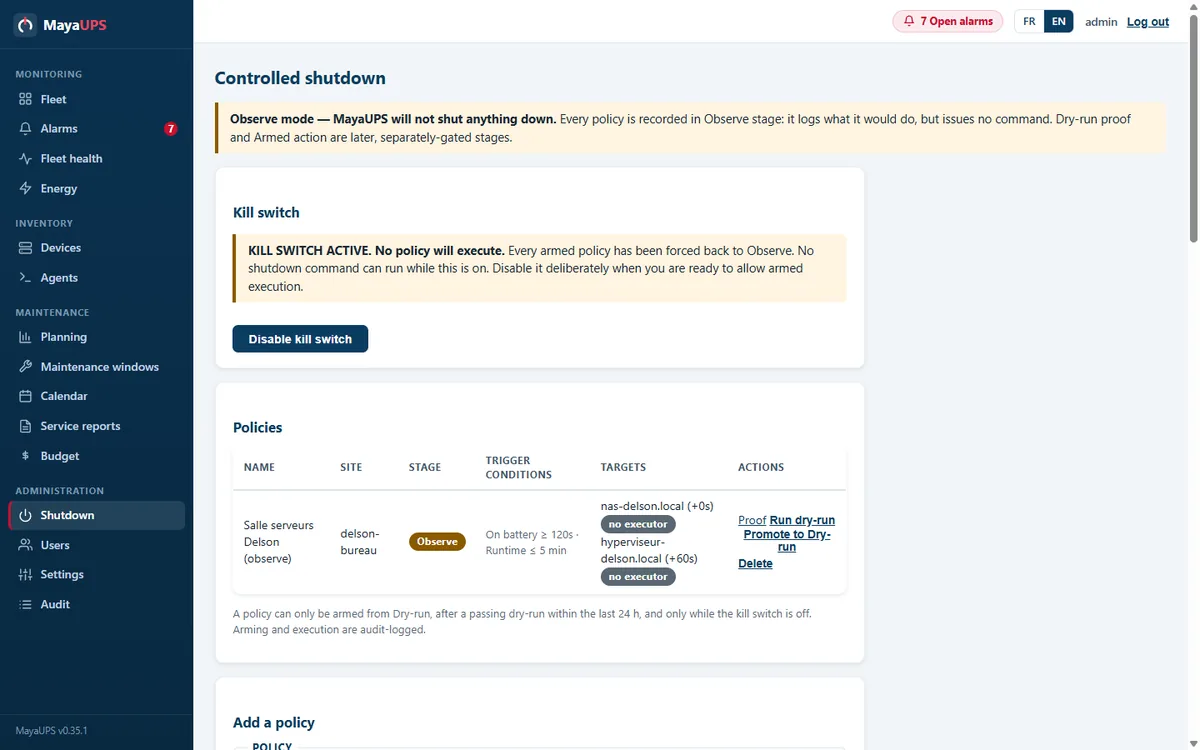
MayaUPS controlled shutdown page: active kill switch and policies in observe mode
Controlled shutdown: a kill switch, watch-only mode, test runs that switch nothing off, and a log of every step before anything acts on its own.
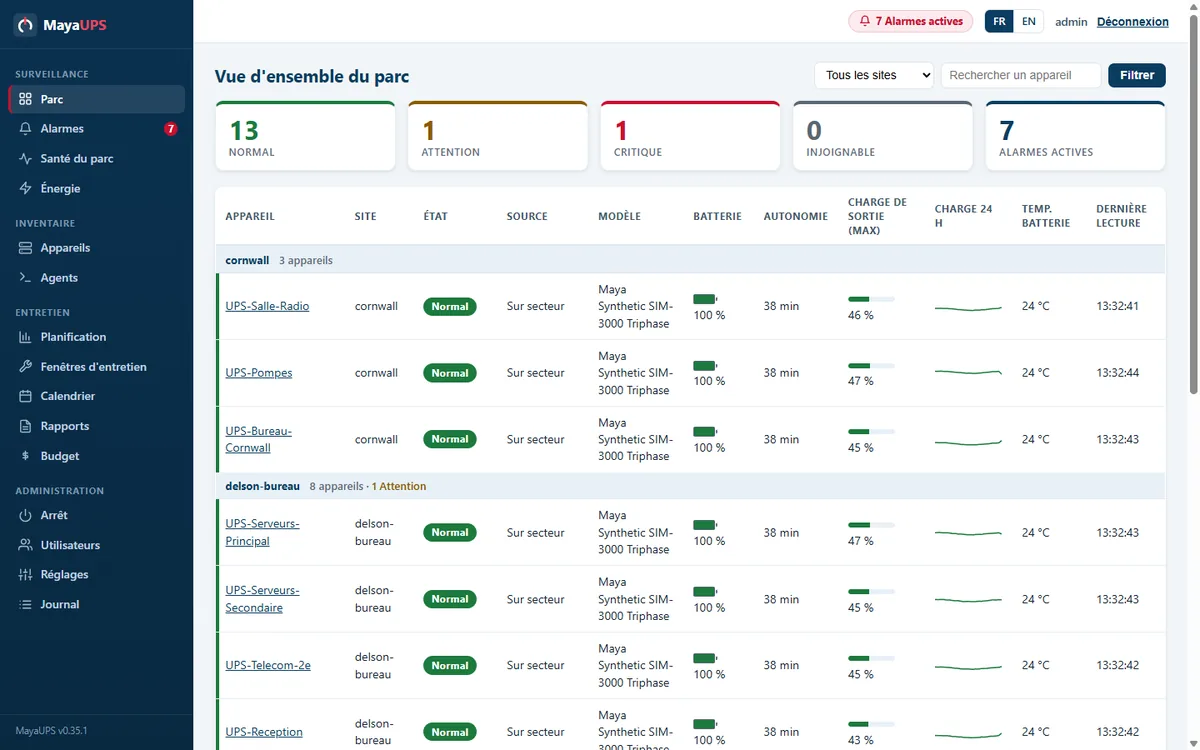
The same fleet view with the interface in French
The same console in French or English: the operator picks the language, the data stays identical.
Battery

Plan battery replacement before it becomes urgent

Installation date, expected service life, maintenance date, runtime and temperature: together they point to the batteries approaching replacement while there is still time to budget for them.

  • Advance notice for battery and maintenance dates
  • Runtime and temperature history for planning
  • Replacement and budget views across the whole fleet
Alerting

One incident, one message

MayaUPS groups related events into one email instead of a stream of duplicates, tells you when things return to normal, and escalates what stays broken.

  • Notifications grouped by site
  • Return-to-normal notices
  • Delayed escalation and an optional daily summary
Shutdown

Test each shutdown sequence before it goes live

Review the rule, run it while it cannot switch anything off, and enable automatic action only once you have seen it do the right thing. Configured installations can use SNMP-SET for the UPS and an authenticated host agent to shut servers down in order.

  • A test run that switches nothing off
  • Servers shut down in the order you set
  • A start-up safeguard that returns automatic policies to watch-only mode
Reliability

Maintenance records and fleet plans, together

Daily monitoring lives next to service records, maintenance calendars, PDF reports, battery plans and a 10-year replacement budget.

  • Daily backups, restore, storage checks and application health monitoring
  • CSV import, connection testing, and discovery you start yourself in read-only mode
  • Viewer, operator and administrator access with an audit history
Onboarding

Bring a fleet in without guesswork

You start discovery yourself; nothing scans on its own. It only reads, it stays inside the one subnet you point it at, and every device can be tested before it counts.

  • Discovery that reads only, on the subnet you chose, when you choose
  • SNMP credentials saved once, encrypted, reused by name
  • A connection test that answers with the device identity or the exact error
  • CSV import with a template and a preview before anything is saved
Organization

Group by site and wake the right person

Devices live in a site tree with per-site rollups. On-call windows send each alert to whoever is scheduled to get it, and maintenance windows keep planned work quiet.

  • Site tree with per-site status and trends
  • On-call windows per recipient
  • Maintenance windows that silence planned work
Energy

Follow energy use and cost across the fleet

The energy view rolls up consumption across your sites, with cost and CO2 estimates, from the same readings that drive the monitoring.

  • Fleet and per-site energy rollups
  • Cost and CO2 estimates, labelled as estimates
  • The same data feeds the charts and the CSV export
Records

Reports, a calendar and a replacement budget

Service visits, maintenance windows and battery work share one calendar. Fleet reports export to PDF, and the budget view projects replacement spending ten years out.

  • Service reports with PDF export
  • Maintenance calendar and windows
  • A 10-year battery and equipment replacement budget
Security

Security and conformity you can show an auditor

The web interface holds the line at TLS 1.2 or newer with strict security headers, and the project publishes its disclosure policy and a software bill of materials. Your monitoring data never leaves your network.

  • HTTPS with Content-Security-Policy, HSTS and frame protections
  • A security.txt disclosure policy and a CycloneDX SBOM
  • WCAG 2.1 AA accessibility and Quebec Law 25 alignment
  • Self-hosted: monitoring data stays in your infrastructure
Deployment

One binary, two platforms, two languages

MayaUPS ships as a single application with the web interface and database inside; there is no separate server or appliance to maintain. Run it as a Windows service or MSI, or on Linux with systemd or Docker.

  • A single binary with the web interface and SQLite database built in
  • Windows service or MSI; Linux systemd or Docker
  • The full interface in English and Canadian French
  • Demo mode starts with a full simulated fleet, alarms and history included

Frequently asked questions

How much does MayaUPS cost?

Tell us how many UPS units you run and where they are. You get a written proposal for your fleet, not a rate card that fits nobody.

Does MayaUPS run in the cloud?

It runs on your own network, and monitoring and shutdown never depend on anything outside it. There is also an optional Cloud portal, in limited beta, that puts several sites on one screen: read-only, hosted in Quebec, and off until you switch it on. Your sites behave the same whether you use it or not.

Which operating systems are supported?

Windows and Linux, including Docker on Linux. The optional agent that shuts your servers down in order runs on Windows and Linux too.